Find and change a design you saved
Find a design
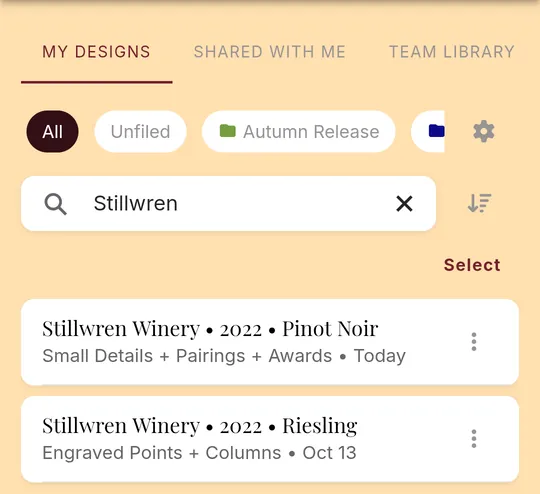
- Tap the floppy disk at the bottom of the screen. My Designs lists everything you've saved, newest first.
- To find one quickly, type in Search designs: a winery, vintage, varietal or the name you gave it.
- The button beside the search box switches the order between newest first and A to Z.
Change it
- Tap the design, then tap Edit.

- Make your changes.
- Tap Save. Your saved design is updated, and it keeps its name.
Copy, rename or delete
Tap the three dots on the right of a design, or swipe it to the left. Then tap:
- the pencil to rename it
- the two pages to make a copy (it's saved with "COPY" on the end of its name)
- the clock to go back to an earlier version
- the red trash can to delete it. This can't be undone.

Designs other people shared
Designs someone shared with you are under Shared with Me at the top of the screen. If you're on a team, your team's designs are under Team Library.
Still stuck? Contact support